
For a quick Google game, start with Chrome Dino if you want to play offline, Snake for an arcade break, or Magic Cat Academy for a game built around swiping spells. For a classic search trick, type do a barrel roll or askew into Google Search. The first spins the results page; the second tilts it.
The best Google Easter eggs reward curiosity without making you hunt through a dozen imitation sites. This guide gives you the exact queries, official destinations and a reason to choose each one. It also separates three things that often get mixed together: Search surprises, games built into Chrome, and playable Google Doodles.
Research checked November 9, 2026. This is a source-based guide, not a hands-on comparison across devices. Google’s documentation confirms the features and original releases discussed below, but a historical announcement does not guarantee that a Search trigger appears in every country, language or browser today. The year identifies this guide’s research date, not a new release of these games.
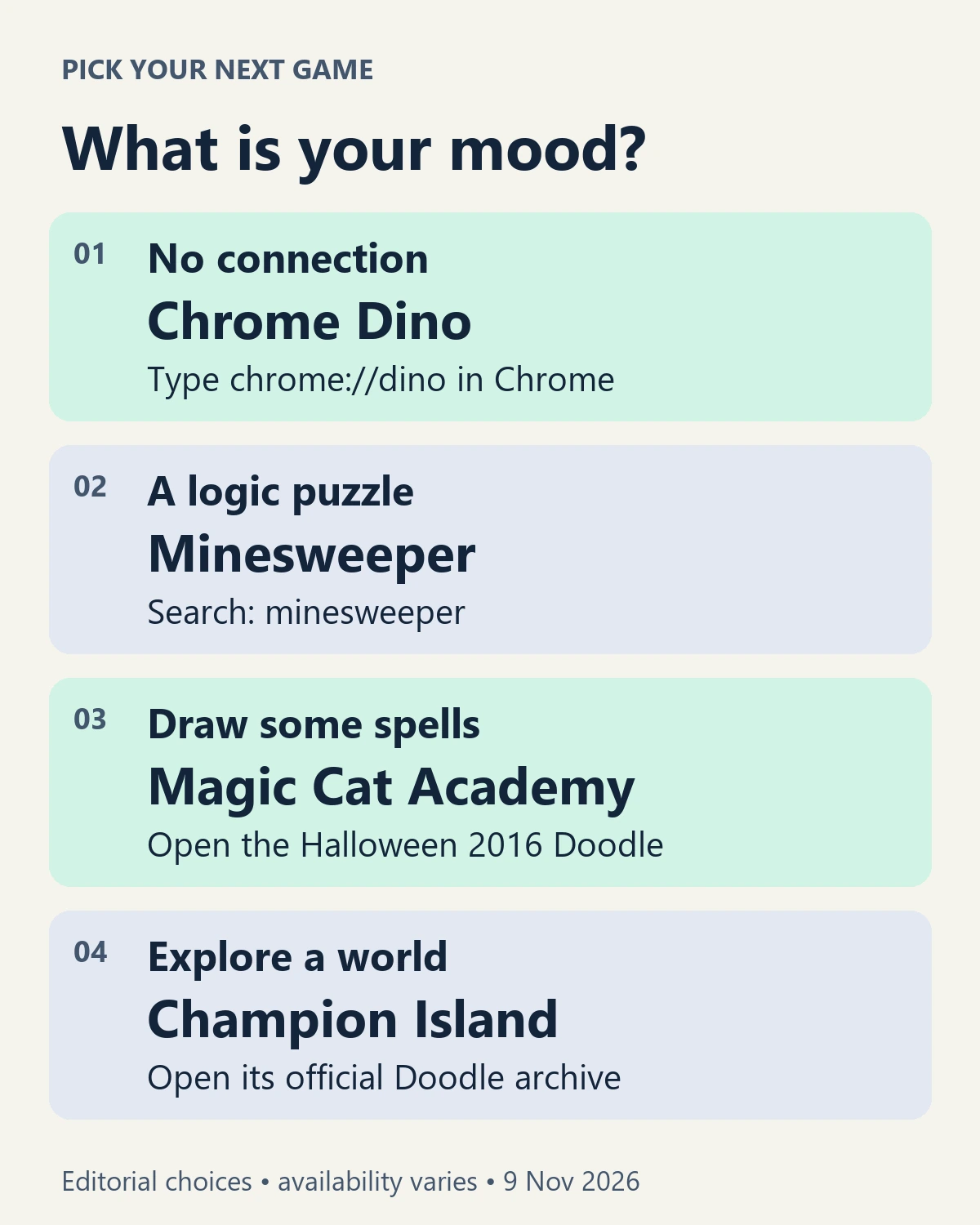
Choose a Google game for the break you have
Use this small decision aid before opening everything at once:
- No internet: open Chrome Dino using the address below.
- Quick reactions: try Snake or the PAC-MAN Doodle.
- A deliberate puzzle: look for Minesweeper, Solitaire or Tic-tac-toe in Search.
- Drawing instead of keyboard movement: open Magic Cat Academy.
- A place to explore: choose Doodle Champion Island.
- A repeatable timing challenge: try Garden Gnomes.
- Just a visual joke: try the barrel roll or Askew searches.
These are editorial suggestions about play style, not measured completion times or difficulty scores. If you want games beyond Google’s own creations, our free browser games shortlist covers a different set of choices.
Chrome Dino: the hidden game you can open while online
Chrome’s dinosaur is the strongest starting point when a connection is unreliable. Google describes it as a game built into Chrome’s offline page, with an endless runner inspired by a prehistoric world without Wi-Fi. It dates to 2014, rather than being a recent addition. See Google’s interview with the creators.
To open it without disconnecting your device:
- Open Google Chrome.
- Type
chrome://dinodirectly into the address bar and press Enter. This is a browser address, so copy it rather than searching for it. - On a keyboard, press Space or Up Arrow to start and jump. Use Down Arrow to duck while running.
- On a touchscreen, tap the game to begin and jump.
The internal address and keyboard mappings are documented in the Chromium project’s Dino implementation. Google’s Easter eggs overview also describes starting with a tap on mobile.
Why choose it: you can work on one skill, timing your jumps, without learning a large set of rules. Our suggested beginner challenge is to make three attempts and pay attention to the obstacle spacing rather than chasing someone else’s score.
Use Chrome itself for this address. Entering it into another browser or a search box is a different action. If a school or work device blocks the game, use an allowed alternative rather than changing administrator controls. Do not assume the Doodles below will work offline just because Dino does.
Four Google Search games worth looking for
Search games appear as interactive results rather than ordinary blue links. Open the linked query, then look for Google’s game panel and its Play control. If you only see websites, use the troubleshooting steps later in this guide.
Snake: choose it for a simple arcade loop
Search for snake game. Steer the snake toward food while leaving yourself room to turn. The attraction is the growing pressure of managing a longer body on the same board.
Try this: keep a route back into open space before taking the next piece of food. Treat that as a planning habit, not a guaranteed winning strategy. Google lists Snake among its games available through Search, alongside Minesweeper and the card and grid games below.
Solitaire: choose it for a quieter solo break
Search for solitaire. Google introduced its Search version with a choice of difficulty. It is a better fit than a runner when you want to consider the next move rather than react to a moving obstacle. The original Solitaire and Tic-tac-toe announcement describes access on desktop and in the Google app at launch.
Try this: before moving a card, ask whether it exposes another useful card or merely rearranges what you can already see. Avoid treating every available move as progress.
Tic-tac-toe: choose it for a familiar shared challenge
Search for tic tac toe. Google’s announcement describes difficulty choices and an option to play against a friend. Use the opponent selector shown in your game panel rather than assuming it offers an online invitation system.
Try this: before making an attacking move, check whether your opponent can finish a line on the next turn. Against another person, agree who is playing each symbol before you start. This is our pick when teaching the rules matters more than finding a long game.
Minesweeper: choose it for deductions instead of guesses
Search for minesweeper. Google includes it in its official Search-games list. The basic puzzle is to identify mined squares from the numbers in neighboring revealed squares.
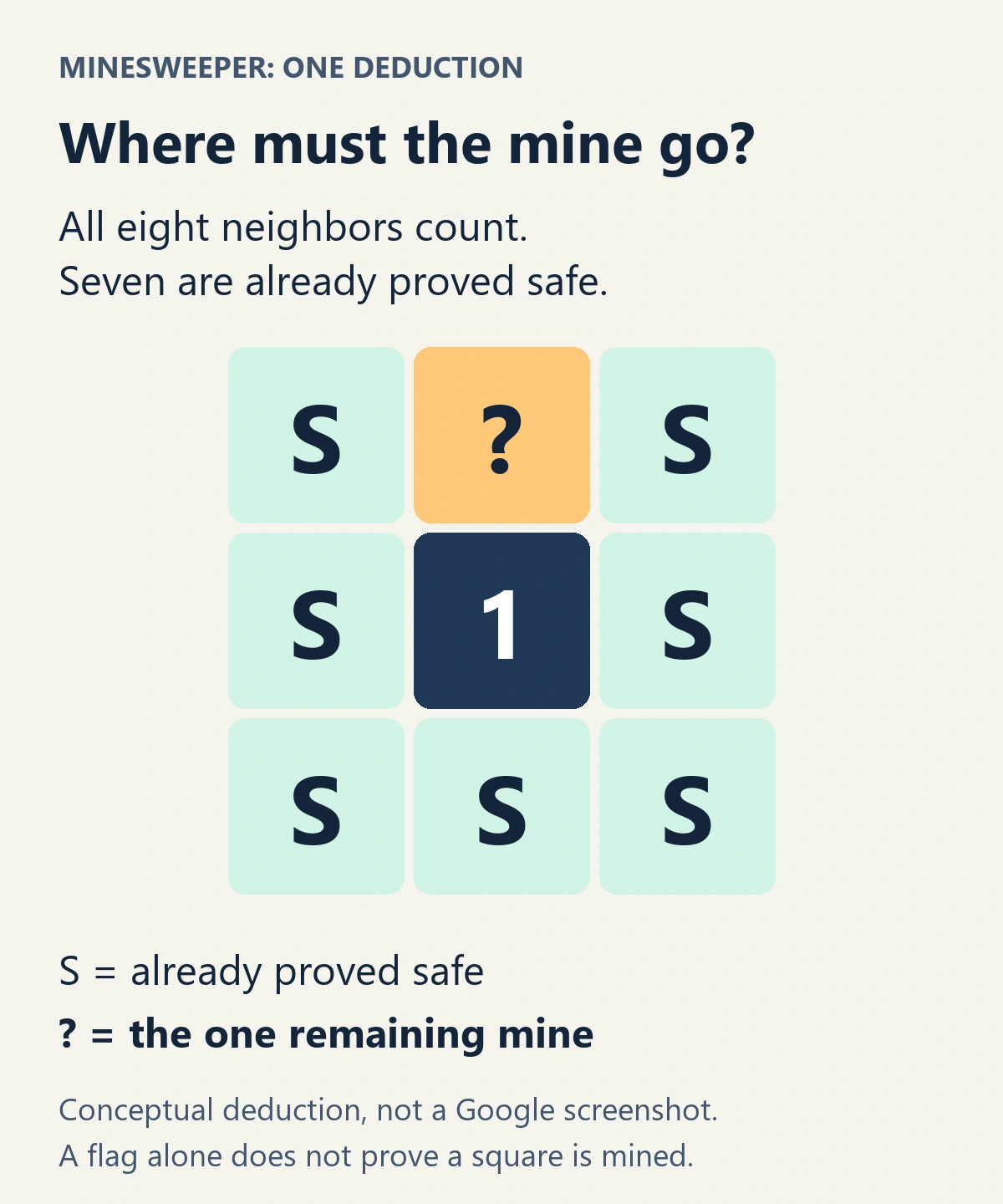
For the standard rules, a clue counts mines in the eight surrounding positions, including diagonals. A flag is your own marker, so placing one does not prove a mine is there. The Mines rules in Simon Tatham’s puzzle documentation explain this underlying logic; that documentation describes a separate game, not Google’s interface.
Worked example: imagine a revealed 1 with eight neighbors. You have already proved seven of them safe using other clues. The one remaining neighbor must contain the single mine. If two neighbors are still unknown, that clue alone cannot tell you which one is mined.
Try this: explain one move aloud before making it: “This clue has one remaining mine and only one possible square.” If you cannot finish the explanation, look for another clue before guessing. Our free puzzle games guide has more options for readers who prefer this kind of reasoning.
Four Google Doodle games with official play pages
Doodles are the artwork and experiences Google creates around people, events and occasions. Some are interactive games. Their archive pages offer a more specific destination than a broad Search query: open the page, then select the Doodle or its play button.
These are archived releases. Their original appearance dates do not mean you need to wait for that holiday to visit the archive. Load them with an internet connection; this guide does not claim offline support, cross-device saves or an active multiplayer service for them.
PAC-MAN: a maze classic with a two-player surprise
Open Google’s 30th Anniversary of PAC-MAN Doodle, originally released on May 21, 2010. Google identifies it as its first playable Doodle and describes recreating the original game logic, graphics and sounds.
There is also an Easter egg inside the game: the original version’s second Insert Coin action adds Ms. PAC-MAN. Google’s instructions assign arrow keys to PAC-MAN and WASD to Ms. PAC-MAN. That makes this a particularly interesting pick for two people sharing a keyboard, provided the archived game’s controls load correctly.
Try this: on your first attempt, learn the maze and where you can turn. Keep the two-player feature as a bonus rather than the only reason to open it. The browser edition is the linked Doodle; there is no need to install a separately advertised PAC-MAN app to reach it.
Magic Cat Academy: swipe the spells you see
Open the Halloween 2016 Doodle. You help Momo defend a magic school by drawing the symbols displayed above approaching ghosts. Google’s archive describes five school-based levels.
Why choose it: the action comes from recognizing and drawing shapes, giving it a different feel from steering with arrow keys. Start by following the tutorial and making distinct strokes. If drawing on a trackpad feels awkward, try a touchscreen device before deciding the game is not for you; that is a practical suggestion, not a tested device ranking.
Want the follow-up? The official Halloween 2020 Doodle takes Momo’s adventure underwater. It is a separate archive entry, so bookmark the version you want to revisit.
Doodle Champion Island: choose it when you want to explore
Open Doodle Champion Island Games Begin!, released on July 23, 2021. Lucky the calico cat explores an island with seven sports mini-games and side quests. Google made the animated scenes and characters with Tokyo-based STUDIO 4°C.
Why choose it: exploration gives you a reason to keep going beyond one high-score attempt. Follow the in-game instructions for each sport; a movement scheme that works in one activity is not a complete guide to every challenge.
Try this: find one sport, learn its controls and complete that challenge before trying to clear the island. The archive’s launch-era references to team standings are historical context. This guide does not verify that those live features still operate in 2026.
Garden Gnomes: experiment with launch timing
Open Celebrating Garden Gnomes, originally released on June 10, 2018. Use a trebuchet to send gnomes across a garden. Google’s description explains that distance plants more flowers and earns more points, with six gnomes offering different shapes, weights and bounce behavior.
Why choose it: a repeated launch gives you a clear experiment. Keep the same gnome while changing your release timing, then try another gnome. Changing one thing at a time makes the outcome easier to interpret. This is a suggested way to play, not a measured comparison of the characters.
Classic Google Easter eggs: barrel roll and Askew
For a visual trick rather than a full game, try these exact queries:
- do a barrel roll: Google’s results page performs a rotation. Skip this one if sudden screen movement is uncomfortable.
- askew: the results page tilts slightly. A fresh search gives you another page to work with afterward.
Google documented both in its 2021 Easter eggs overview. They are small interface jokes, so a list promising dozens of levels or a downloadable “unlocker” is describing something else.
Keep older discoveries in perspective. Google’s 2013 Easter eggs article described Zerg Rush, for example. That establishes its history, not its current availability. We have left it out of the main recommendations because we could not verify a current official playable route. A third-party recreation can be entertaining, but it should be identified as a recreation.
What to do when a Google game or Easter egg does not appear
Start with the destination, then check how the game loads:
- Confirm where you typed.
chrome://dinobelongs in Chrome’s address bar. Search phrases belong in Google Search. Doodle links open their archive pages. - Use the exact English query linked above. Language and region may affect what Search displays. An ordinary list of results is not proof that the game never existed.
- Look for the game panel or the archive’s play control. Opening a discussion about the game is different from opening the game itself.
- Retry in an up-to-date mainstream browser. Script-blocking extensions or restrictive browser settings can interfere with interactive pages. If appropriate on your own device, compare in a clean browser profile; do not disable security protections or bypass organizational restrictions.
- Check input and focus. Click or tap inside the game before trying keyboard controls. For a touchscreen game, follow its gesture tutorial.
- Choose another route if it still fails. Use an official Doodle page instead of repeatedly refreshing a missing Search panel. No extension or paid service is required by the launch methods in this guide.
We could read the official documentation and archive pages during research, but could not perform a live gameplay check in the available browser environment. Phone, tablet, accessibility and regional behavior therefore remain unverified. Avoid assuming that a game loading on one device establishes support everywhere.
A five-stop Google games challenge
Copy this checklist into a note and mark each item when you have tried it. The goal is to sample different interactions, not collect a perfect score.
- Open Dino from
chrome://dinoand complete three attempts. - Make one Snake move with a planned escape route.
- Explain one Minesweeper deduction before revealing a square.
- Follow the opening spell tutorial in Magic Cat Academy.
- Find one sport in Champion Island, or compare two launch timings in Garden Gnomes.
If one Search panel is missing, substitute the official PAC-MAN Doodle. Bookmark the official game you enjoyed most so your next break starts with playing rather than another search.