
Last checked: 14 November 2026. This hub brings together the announced release schedule, preparation guides and official update sources. It is based on desk research; GTA 6 has not launched at the time of this check.
GTA 6 is scheduled for Thursday, 19 November 2026. Rockstar lists PS5 and Xbox Series X|S as its native console platforms. Use this page to choose your next step, whether you need the right countdown, a download check or the latest official announcement. Rockstar’s GTA VI page is the starting point for the current release date and platform list.
Start here: GTA 6 launch guides
- When can I play? Open our GTA 6 release times worldwide guide for regional examples and the separate cloud-streaming schedule.
- Is my console ready? Use the GTA 6 launch checklist to work through your account, storage, installation and updates. It includes interactive checkboxes and a copyable notes version.
- Has anything changed? Check the official sources in the dated update section below before changing your launch-night plans.
These are two different jobs: the release-time guide helps you choose when to start; the checklist helps you prepare to start. A completed download does not establish that your copy is unlocked.
GTA 6 countdown: choose your way to play first
For installed PS5 and Xbox Series X|S copies, Rockstar’s regional release schedule specifies midnight local time on 19 November. This is the night between Wednesday 18 November and Thursday 19 November.
For Xbox Cloud Gaming, Microsoft’s 10 November announcement gives a separate start: 1 a.m. Eastern Time on 19 November, equivalent to 06:00 UTC. Xbox announces streaming on Xbox One and Xbox Series X|S. The game must be purchased separately; cloud access, purchasing options and eligibility vary by market and device.
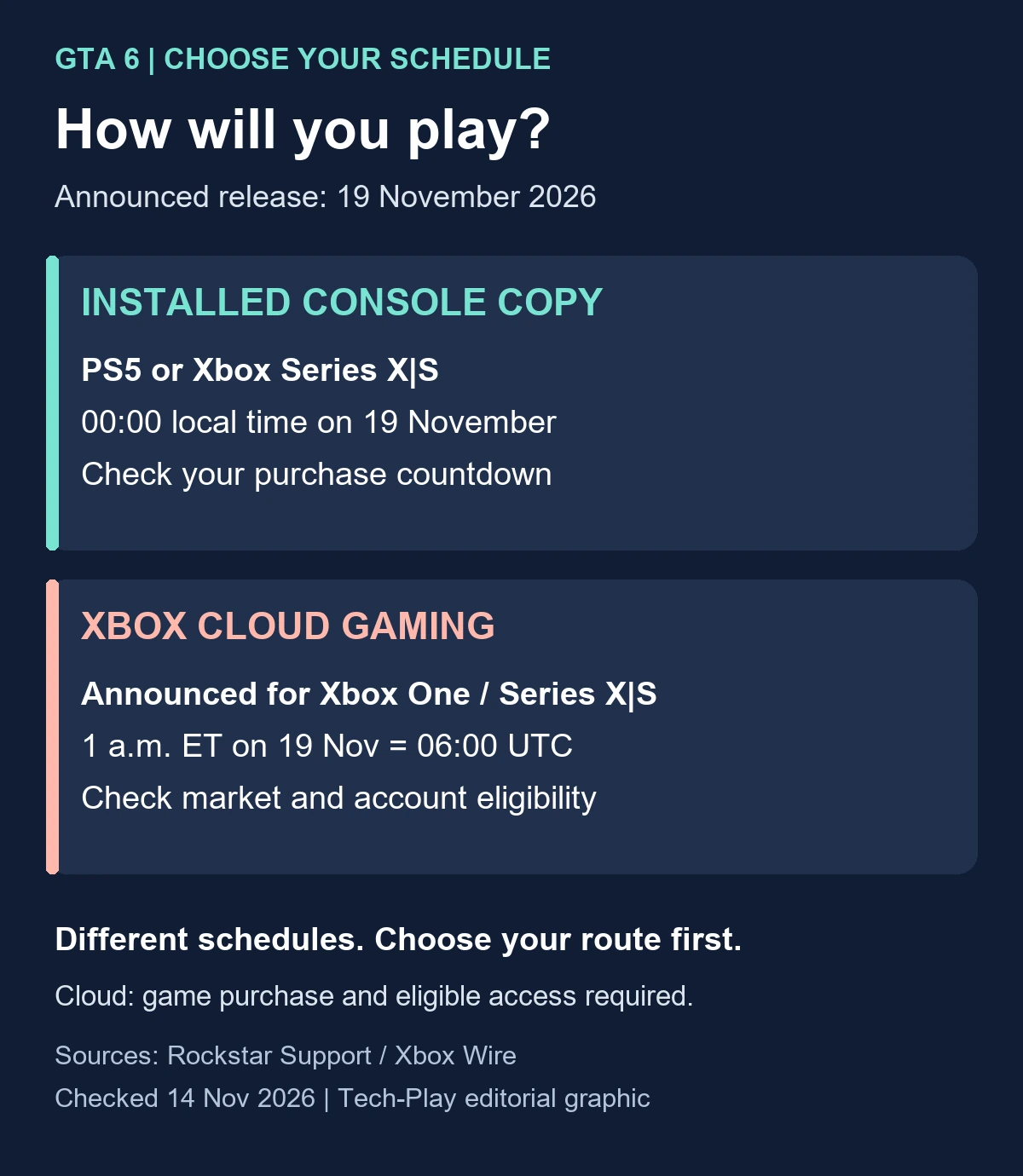
A single worldwide timer can therefore answer the wrong question. For example, the announced installed-console time in Vienna is 00:00 CET on 19 November, while the announced cloud start converts to 07:00 CET that day. London has the same local-midnight console rule, with cloud streaming starting at 06:00 GMT. These are our conversions of the published schedules, not checks of individual accounts.
For the countdown attached to a PS5 pre-order, open Game Library, select the game and look for its release timer. Sony documents that route in its pre-order and auto-download guide. Check your own purchase entry again near launch, especially if its region differs from where you currently live.
This hub does not display a live timer or inspect your purchase. Use the console’s purchase countdown and the linked regional guide to plan the correct session.
Latest verified GTA 6 launch updates
The dates here are the dates of the announcements or support updates. We checked their contents on 14 November 2026. This is an editorial snapshot, rather than a live incident feed.
10 November: Xbox announces launch-day cloud access
Xbox’s announcement adds a streaming route for supported Xbox consoles, including Xbox One. That is distinct from a native Xbox One installation. Before paying, check that your market and account support the offer and what cloud access costs in addition to the game. The announced cloud start remains a future scheduled event at this check.
10 November: Rockstar’s site points to preloading
Rockstar’s official game page now links to its 10 November preload announcement. Its support schedule lists digital preload opening on 10 November: local midnight for PS5 and 00:00 GMT worldwide for Xbox Series X|S. If you already ordered, check the actual queue instead of assuming automatic download has finished.
3 November: Rockstar’s regional timing FAQ was updated
The support FAQ specifies the local-midnight console release described above. A launch date and a finished preload serve different purposes: one sets the announced access time, while the other prepares the files. Neither establishes that your account, installation or connection will be ready without further checks.
A five-minute launch plan you can copy
Use this short planning note before opening the full checklist:
- My route: installed PS5, installed Xbox Series X|S, or supported Xbox cloud access.
- My time: write the date, city and time zone. Avoid writing only “Thursday midnight,” which can be read two ways.
- My purchase: confirm the account and successful order or code redemption.
- My preparation: inspect installation progress and available updates, or verify cloud eligibility for the streaming route.
- My fallback: keep the exact error message and the relevant support link if access fails.
If friends are comparing launch times, share a calendar invitation that includes the time zone and the delivery method. Someone counting down to cloud access may have a different appointment from someone using an installed copy.
GTA 6 launch questions
Can I preload GTA 6 and play immediately?
Preloading prepares the files ahead of the announced release. Check the purchase countdown before expecting access. For the practical account, storage and download checks, use the launch checklist linked above.
Is there a GTA 6 PC or PS4 launch date?
Rockstar’s checked game page lists PS5 and Xbox Series X|S and does not provide a native PC or PS4 release date. Xbox’s cloud announcement covers Xbox One streaming; it does not establish native PC, PS4 or Xbox One releases.
Does this hub include tested gameplay tips or launch problems?
No gameplay testing or launch-day incident monitoring was performed for this page. It links verified preparation information and announced schedules. A future release date is not evidence that a game has shipped or that a reported problem affects everyone.
Where should I go if the game will not download or open?
Start with your platform’s support and record the error code. PlayStation’s GTA VI support page covers orders, code redemption, installation and download checks, and directs gameplay, patch and bug questions to Rockstar. Xbox’s announcement links to its store and support destinations. Check those official routes before cancelling a large download or buying a second copy.
Before your planned session, reopen your purchase entry and the official release schedule. Then use the launch checklist to check the parts of preparation you can control.

[…] For launch timing and console setup, see the Tech-Play GTA 6 launch hub. […]