
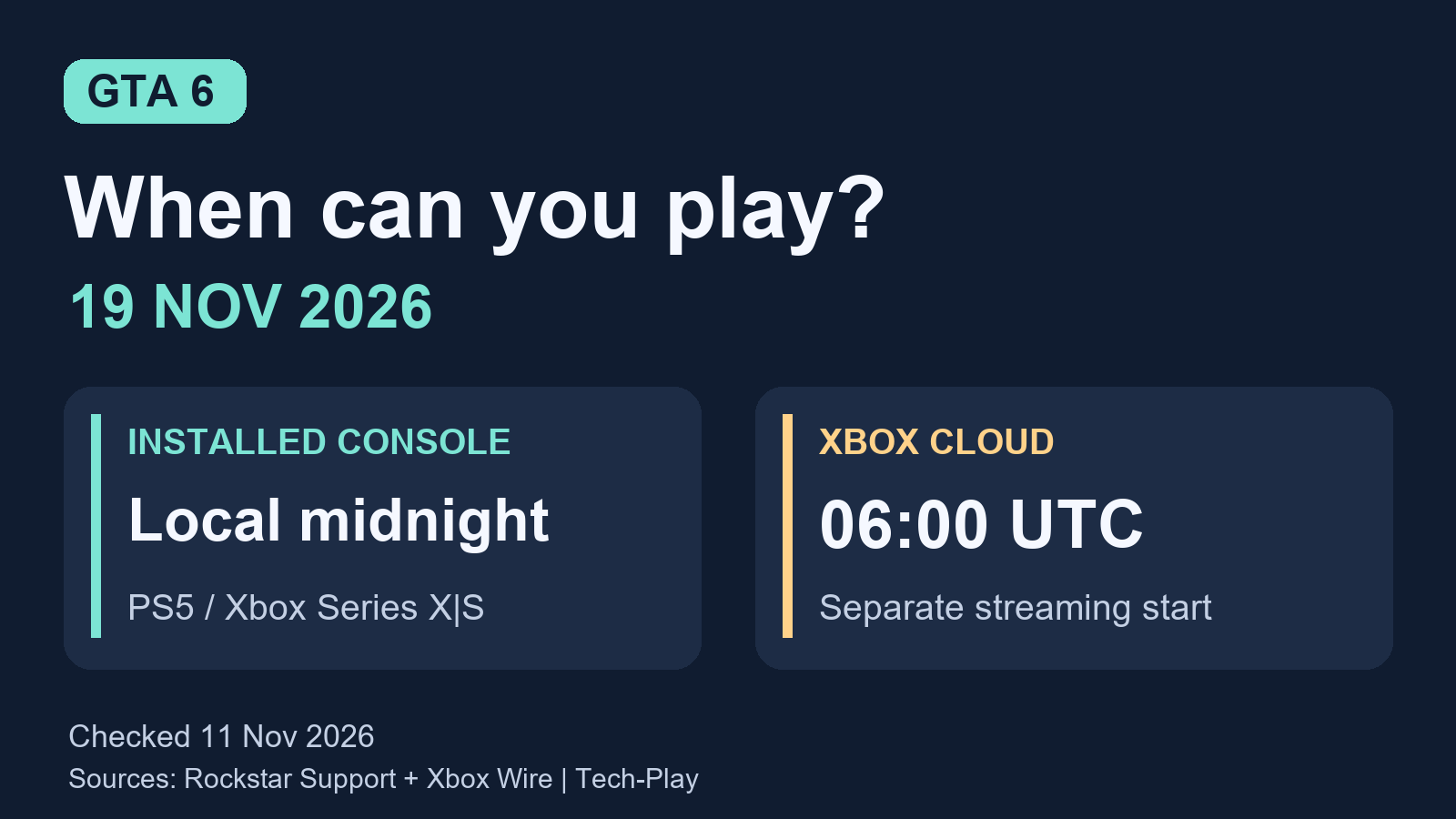
GTA 6 releases at 00:00 local time on Thursday, 19 November 2026, for installed PS5 and Xbox Series X|S versions, according to Rockstar’s regional release schedule. That means the midnight between Wednesday and Thursday, rather than the end of Thursday.
Xbox Cloud Gaming has a separate start: 1 a.m. Eastern on 19 November, which is 06:00 UTC. Choose the schedule for how you will actually play.
Last updated: 11 November 2026. This guide is based on official documentation, not an early-access gameplay test. Recheck the linked sources and your purchase’s countdown before launch.
GTA 6 release time by country and time zone
For installed console copies, Rockstar’s announcement describes a rolling local-midnight release, rather than one simultaneous worldwide unlock. The regional examples below apply that announced rule; they are not individually verified storefront countdowns. Each is 00:00 on 19 November 2026:
Americas
- United States and Canada: midnight in your applicable local zone, including Pacific (PST, UTC-8), Mountain (MST, UTC-7), Central (CST, UTC-6) and Eastern (EST, UTC-5).
- Brazil, São Paulo: midnight BRT (UTC-3).
Europe and Africa
- United Kingdom: midnight GMT (UTC+0).
- Austria, Germany, France and mainland Spain: midnight CET (UTC+1).
- South Africa, Johannesburg: midnight SAST (UTC+2).
Asia and Oceania
- United Arab Emirates, Dubai: midnight GST (UTC+4).
- India: midnight IST (UTC+5:30).
- Singapore: midnight SGT (UTC+8).
- Japan: midnight JST (UTC+9).
- Australia, Sydney and Melbourne: midnight AEDT (UTC+11).
- New Zealand, Auckland: midnight NZDT (UTC+13).
Countries spanning several time zones need a city-specific check. Sydney’s time does not cover all of Australia, and the four North American zones above do not cover every US or Canadian location. These examples explain timing, not country-by-country permission to buy or stream the game. Check availability in your own store.
Xbox Cloud Gaming starts at a different time
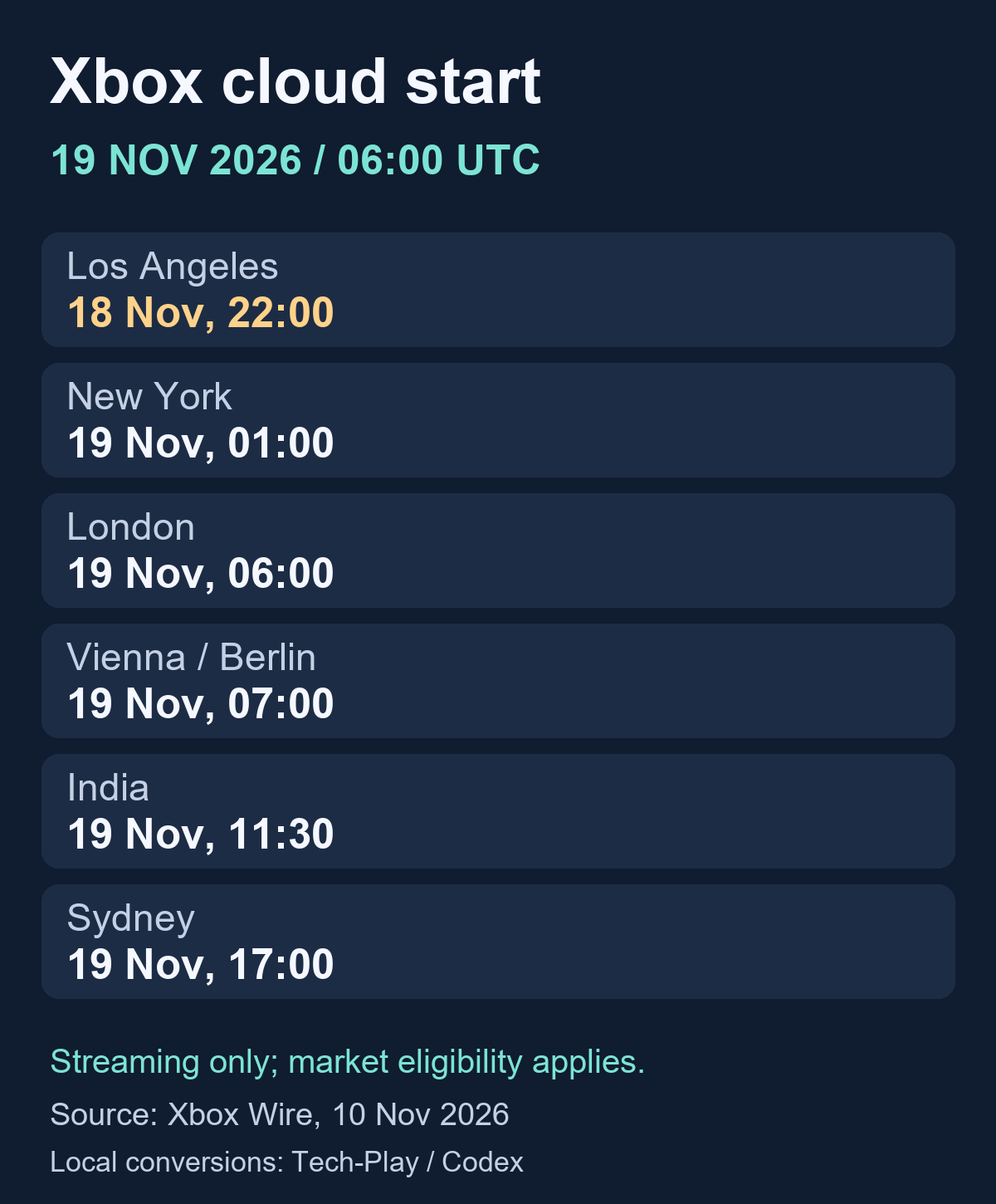
Xbox’s 10 November announcement gives streaming its own start time of 1 a.m. ET on 19 November. At that date, Eastern Time is EST, UTC-5. Our conversions of that single instant are:
- Los Angeles: 10 p.m. PST, Wednesday 18 November.
- Denver: 11 p.m. MST, Wednesday 18 November.
- Chicago: midnight CST, Thursday 19 November.
- New York: 1 a.m. EST, Thursday 19 November.
- London: 6 a.m. GMT, Thursday 19 November.
- Vienna and Berlin: 7 a.m. CET, Thursday 19 November.
- India: 11:30 a.m. IST, Thursday 19 November.
- Tokyo: 3 p.m. JST, Thursday 19 November.
- Sydney: 5 p.m. AEDT, Thursday 19 November.
- Auckland: 7 p.m. NZDT, Thursday 19 November.
Microsoft confirms launch-day streaming on Xbox One and Xbox Series X|S. It requires buying GTA VI separately, with cloud availability and account eligibility varying by market and device. The company also announces purchasable cloud playtime in supported markets without a Game Pass subscription. Do not assume owning the game alone covers streaming access or that a subscription includes the game.
For broader membership context, see Tech-Play’s explanation of Xbox Game Pass costs and limitations. Check Microsoft’s current account terms before paying for cloud access.
How to check the countdown for your PS5 purchase
PlayStation’s GTA VI support page independently confirms the local-midnight release and explains where to find the timer:
- Sign in with the account used to buy or redeem the game.
- Open Game Library > Your Collection on PS5.
- Select your GTA VI pre-order. A release countdown appears.
- Select the timer to check the download options and confirm that pre-loading has started.
Use the countdown attached to your actual purchase when planning a session. If it conflicts with the published schedule, check with platform support rather than assuming a social-media countdown applies to you.
If you bought through a different region or recently moved, check your PlayStation account’s country. Sony says the registered country cannot be changed after account creation, and voucher codes must match the account region. A city-based timing list cannot settle a cross-region purchase problem.
A quick checklist before launch night
- Identify your version: installed PS5 or Xbox Series X|S, or Xbox cloud streaming. Use its matching schedule.
- Confirm the purchase: check your order or redemption on the account you intend to use.
- Finish the download: a release time is not a promise that installation will finish then. Check progress before your planned session.
- Leave room for setup: allow time for any required updates, account checks or connection troubleshooting.
- Arrange group plans carefully: if friends live in different regions, share a calendar invitation with a time zone rather than writing only "midnight."
For example, a Vienna player planning an installed-console session under the announced rule would choose 00:00 CET on Thursday 19 November, the night of Wednesday 18 November. Their cloud-streaming alternative starts at 07:00 CET. Those are different appointments on the same date.
GTA 6 launch-time questions
Does pre-loading let me play early?
No. Downloading the files ahead of time prepares the installation; the published release schedule still applies. Check the game’s countdown rather than treating a completed download as an early-access entitlement.
Can I use this schedule for PC or PS4?
No. Rockstar’s GTA VI page lists PS5 and Xbox Series X|S. It does not give a native PC or PS4 release schedule. Xbox One’s announced cloud access is streaming, not a native Xbox One version.
Will changing my console clock unlock GTA 6 sooner?
There is no verified clock-change method in the official launch sources checked for this guide. We have not tested a region-switch workaround. Use the timer and entitlement for your purchase; changing a clock is not evidence that access has changed.
What if a website offers a playable download before launch?
Treat it as unverified unless the offer can be confirmed through Rockstar or the platform’s own store. Do not enter your platform password into an unofficial "unlock" service. Tech-Play’s safe game download guide explains how to check a download’s source before installing it.
For changes after this update, return to Rockstar’s regional schedule and your platform’s official support page before adjusting your plans.


[…] Preloading downloads the files ahead of release; it does not grant early access. Check your purchase’s countdown again close to launch. For regional examples, see Tech-Play’s GTA 6 release times worldwide. […]