

You can make a browser game with AI without writing the code yourself. Start with one action—jumping—then ask the AI to build a tiny endless runner, test it, and fix one problem at a time. The prompt below gives you a concrete starting point.
The challenge: spend 15 minutes trying to turn that prompt into something a friend can play. That is a suggested time budget, not a measured build time or a promise. Account setup, generation queues and bugs can take longer.
This is a documentation-based walkthrough, researched on November 3, 2026. The prompts are editorial examples; we have not completed a timed build in the services described here.
Choose a tool before you start the clock
For the main walkthrough, use Google AI Studio. Its Build mode documentation describes generating web apps from a prompt, previewing them and refining them through chat. Choose a web app for this project.
Google’s billing guide says new accounts start on a free tier with access to certain models and rate limits. Free access is limited; check the model and billing state shown in your account. This exercise does not require you to enable paid services.
You must be 18 or older, and live in a supported region. The list includes Austria, the United Kingdom, the United States and many other countries, but it is not universal.
Two alternatives deserve a quick check:
- Google Playground: Google’s October 7 announcement describes prompt-based game creation and sharing, with a U.S. launch for adults 18+ and tiered creation access based on Google AI subscriptions. Check your account’s actual access and allowance before starting. Do not assume it is a worldwide, unlimited free game maker. Our Playground explainer covers the wider concept; this guide focuses on building and checking one small game.
- Claude: Artifacts are available on the Free plan, including single-page websites and interactive tools. Ask for a playable game artifact. However, the current sharing guide reserves “anyone with the link” sharing for paid plans; Free publishing applies to legacy chat artifacts. Free creation and free public sharing are different questions.
You do not need to move the project between tools. Cursor is optional if you already use it; its Free plan lists limited agent requests. Adding an editor to a first attempt gives you another environment to manage.
Minutes 0–3: give your runner one clear rule
Your first game needs a player, an action, an obstacle and an ending. Try this brief:
A little robot runs automatically. Press Space or tap Jump to clear crates. Hitting a crate ends the run. Survive longer to increase your score.
That is enough to start. Leave multiplayer, accounts, online leaderboards, shops and generated music for a later project. They introduce more things to fix before you know whether jumping feels good.
For inspiration, look at the simple loops in our endless runner games guide. Borrow the idea of a clear action and immediate feedback; give your own runner an original theme.
Minutes 3–7: paste this browser-game prompt
Open Google AI Studio Build, select a web app and enter the following brief. Google documents an input box and a live preview; interface labels may change.
Build a small playable 2D endless-runner web game called Crate Escape. I do not want to edit code manually. The player is an original geometric robot that runs automatically along a flat track. Space or a large on-screen Jump button makes it jump. Support keyboard and touch input. Prevent Space from scrolling the page during play, and allow jumping only while grounded. Spawn one type of low crate with generous gaps so each obstacle is possible to clear. Start slowly. Increase difficulty gradually with a sensible speed cap. Show a score based on survival time. On collision, stop the run and show the final score and a Restart button. Restart must reset the score, speed, player and obstacles. Include a start screen with one sentence of instructions. Use simple original shapes, high contrast and a responsive layout. Keep this game client-side: no Gemini calls during play, no external APIs, no login, no database, no payments, no tracking and no downloaded art or audio. Do not add features beyond this brief. Tell me when the preview is ready and what I should test.
The useful detail is the behavior you want, especially after a collision or restart. “Make a fun game” leaves those decisions open. This brief gives you observable checks.
AI helps create the code; the game itself does not need an AI model to decide when a robot jumps. Asking for a game without runtime AI calls also keeps this first project simpler.
Minutes 7–11: play three deliberately awkward runs
Do not spend the entire session choosing colors. Try to break the basic loop first.
- Lose on purpose. Let a crate hit the robot. Does movement stop? Can you read the score? Does Restart return you to a clean run?
- Press too much. Hold Space, tap repeatedly and try jumping in midair. Does the robot behave consistently, or can it float over everything?
- Check the small screen. Narrow the preview, then use a real phone when a share link is available. Can you see the next obstacle and reach Jump without covering the action?
Also check that the score stops after a collision and that restarting several times does not make the game run faster unexpectedly. These are acceptance checks for your version, not results we claim to have observed.
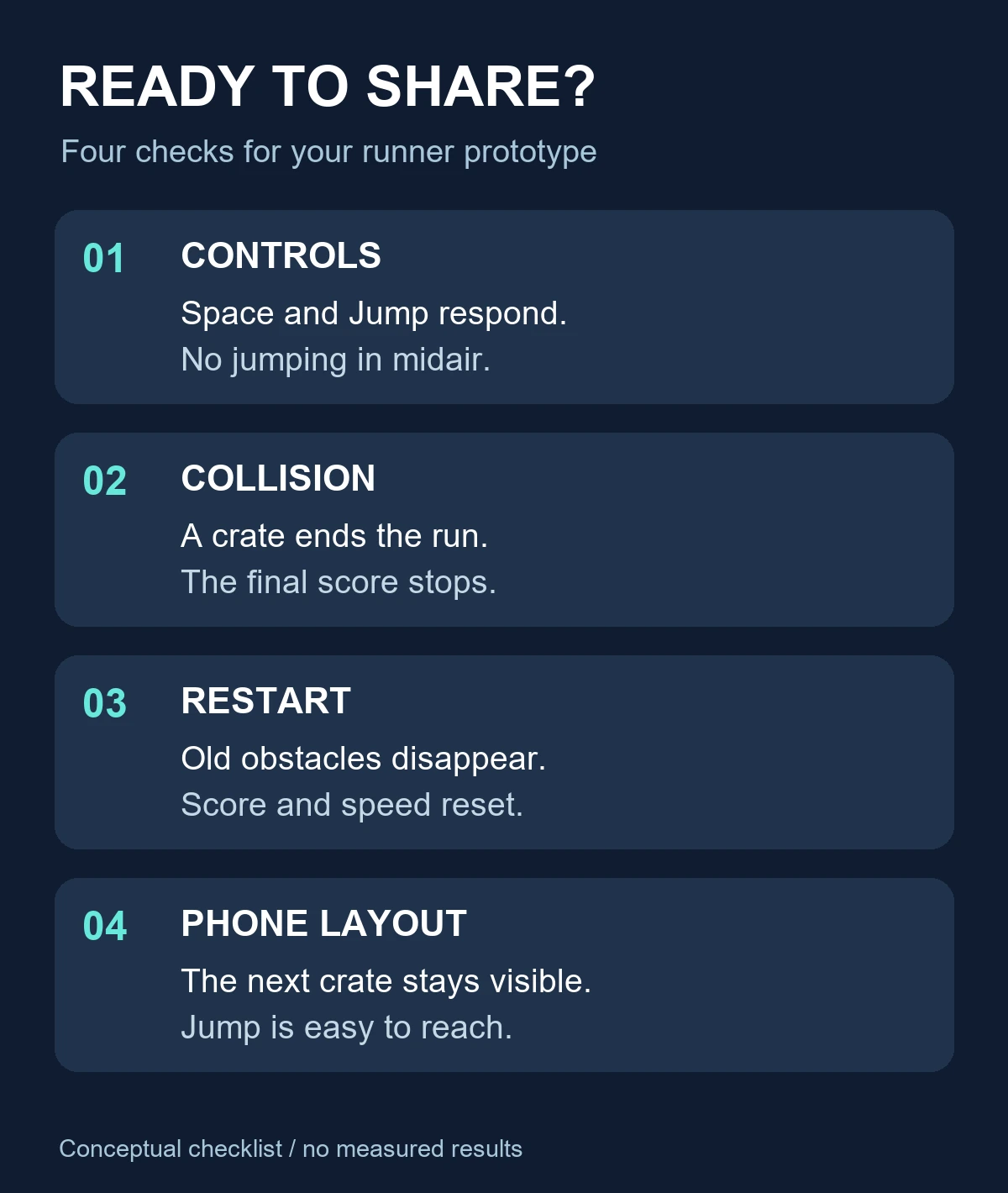
A desktop preview cannot prove that touch controls work on a phone. If you cannot check a device, say which controls you have actually checked when you share your prototype.
Minutes 11–13: fix one fault with one prompt
Describe what happened, what you expected and what should stay the same. Use whichever example matches your problem:
- Impossible obstacles: “At the current jump height and speed, some crates arrive too close together. Increase the minimum gap so the player can land before the next required jump. Keep the art and controls unchanged.”
- Repeated jumps: “Holding Space triggers more than one jump. Make each press trigger one jump, only while grounded. Apply the same rule to touch input.”
- Broken restart: “After Restart, the previous obstacles remain. Reset all active obstacles and timers, the player position, speed and score. Check that repeated restarts do not create duplicate game loops.”
- Awkward phone layout: “The Jump button overlaps the track on a narrow screen. Place a large touch control below the action and keep instructions and score readable without horizontal scrolling.”
- Blank preview: “The preview is blank. Check the build and runtime errors, fix the cause, and restore the smallest working version of the runner. Do not add features.”
Replay the failing action after each change. If the tool runs out of free usage, save what you have and return when your allowance permits. A paid upgrade is not a prerequisite for understanding this exercise.
Minutes 13–15: share a challenge people can understand
In AI Studio, use the app’s sharing controls and check who can open it. Google’s Build documentation warns that people you share with can see and fork the code; API calls in shared apps can also count toward your usage and incur costs with paid models. Keep personal information out of the project and confirm your version follows the no-API brief.
Test the link in a separate browser session before sending it around. If it requires sign-in or denies access, tell your friend or resolve the permission issue first. Public deployment is a separate step: Google’s billing documentation describes a Starter Tier for up to two apps on eligible accounts, while other hosting arrangements can involve billing. You can finish this challenge with a working preview and leave deployment for later.
For a useful invitation, give someone a specific goal:
I made a tiny robot runner with AI. Can you survive 30 seconds? Try three runs, then tell me whether the hardest part was timing, controls or seeing the next crate.
Change the target to something achievable in your version. This gives your friend a reason to play and gives you feedback you can act on. It does not guarantee shares or a viral hit.
Keep this checklist for your next game
Before you call a prototype ready to share, confirm:
- A new player can explain the goal after reading one sentence.
- The advertised keyboard or touch control works.
- Losing ends the run and freezes the final score.
- Restart clears the previous run completely.
- Obstacles leave enough room for the intended move.
- The link works for its intended audience, with any sign-in requirement explained.
- You understand any usage or hosting costs before enabling them.
Then change one creative detail: turn crates into puddles, make the robot a bouncing dumpling, or swap the setting for a moon base. Keep the working rules while you experiment. A small game that someone wants to retry is a better next step than a long feature list you have not checked.

[…] a separate build exercise, our browser-game runner challenge includes a prototype brief and checks for controls, collisions and restarts. This news concerns […]